view · stable · app · since 2026-09
AuthShell
Purpose
The shell of a page that holds one thing: sign in, ask for access, choose a password, type a code, pair the extension. One column, centred in the height: the mark as a way out, the h1, a lead with its links, the card on the surface holding the form, the footer for the way back.
When to use, when not
Use it for every page a visitor sees before the lab, and for the extension pairing page. Not inside the lab, which has its own shell; not for a dialog.
Anatomy
- The top row: the mark, a link to the site or the lab, and the theme switch across from it.
- The title.
- The lead, with its links.
- The card, holding the messages and the form.
- The footer.
Props
| Name | Type | Default | What it does |
|---|---|---|---|
title | string | The page's title, as its h1. | |
logoHref? | string | '/' | Where the mark leads: the site for a visitor, the lab for a signed-in user. |
themeName? | string | 'theme-auth' | The theme switch's radio group name; two shells on one page each need their own. |
width? | 'md' | 'lg' | 'md' | `md` for a form, `lg` for a page with more to read. |
as? | 'main' | 'div' | 'main' | `main` on a page; `div` inside a page that already has one. |
headingLevel? | 1 | 2 | 1 | The title's level: 1 on a page, 2 inside a page that already has an h1. |
lead? | Snippet | A sentence under the title, with its links. | |
children | Snippet | The card's content: the form, the messages. | |
footer? | Snippet | The way back, under the card. |
States
The sign-in page, and a page holding a message.
message
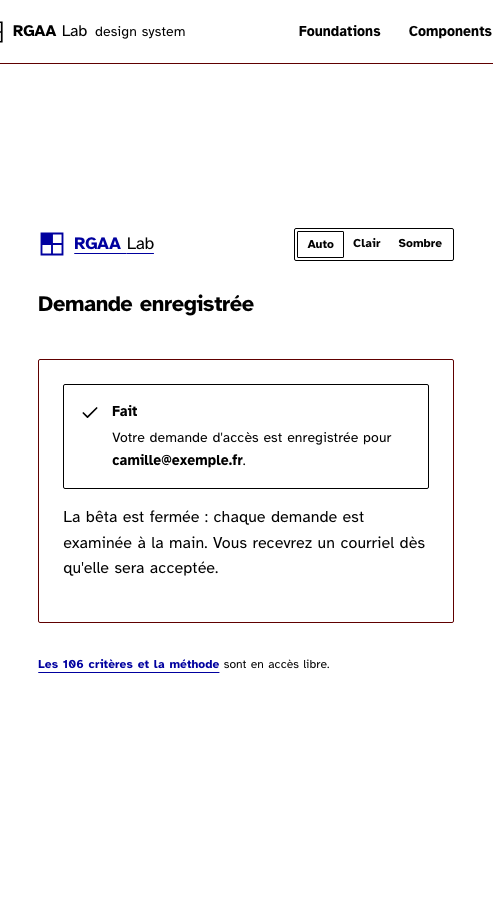
The same shell holding a message and no form, as the page after a request.
Light
Demande enregistrée
Fait
La bêta est fermée : chaque demande est examinée à la main. Vous recevrez un courriel dès qu'elle sera acceptée.
Dark
Demande enregistrée
Fait
La bêta est fermée : chaque demande est examinée à la main. Vous recevrez un courriel dès qu'elle sera acceptée.
320 px, light
Demande enregistrée
Fait
La bêta est fermée : chaque demande est examinée à la main. Vous recevrez un courriel dès qu'elle sera acceptée.
320 px, dark
Demande enregistrée
Fait
La bêta est fermée : chaque demande est examinée à la main. Vous recevrez un courriel dès qu'elle sera acceptée.
216 px, light
Demande enregistrée
Fait
La bêta est fermée : chaque demande est examinée à la main. Vous recevrez un courriel dès qu'elle sera acceptée.
Forced colours, captured
signIn
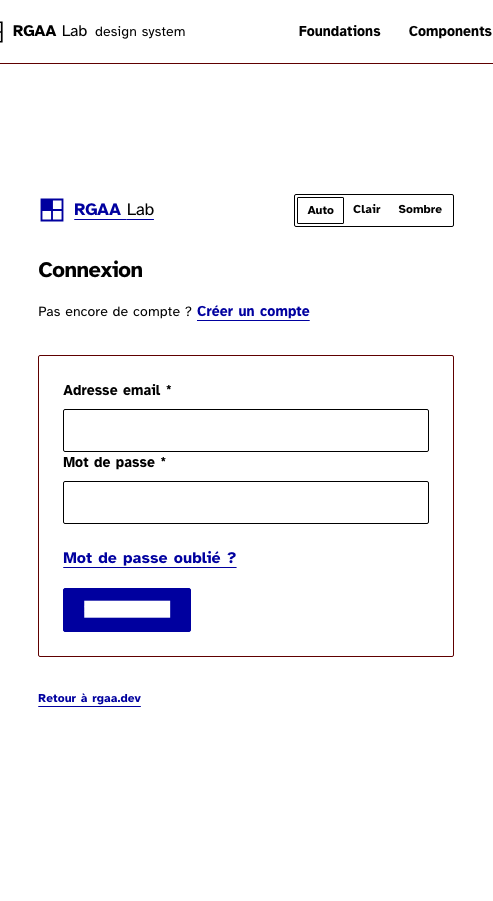
The column as the sign-in page uses it: the mark, the h1, a lead with its link, the card with the form, the way back. Rendered as a div at level 2 here, since this page already has a main and an h1.
Light
Dark
320 px, light
320 px, dark
216 px, light
Forced colours, captured
Accessibility contract
- Role and name:
mainwithid="main-content"andtabindex="-1"on a page; the h1 is the page’s name. Inside a docs page, a div at level 2. - Keyboard, focus: the skip link’s target; then the mark, the theme switch, the lead’s links, the form, the footer, in reading order.
- The theme switch’s radio group takes
themeName,theme-authby default; two shells on one page give two names, or the browser merges them into one group. - Live regions: none of the shell’s; the page’s Alerts carry theirs.
Content rules
French. The title is the page’s name as a noun phrase (“Connexion”, “Nouveau mot de passe”); the lead is one sentence with its link; the footer is the way back.
Do and don’t
- Do put the Alerts inside the card, above the form.
- Do keep
logoHrefon the lab for a signed-in user. - Do not nest a second main; render as a div inside a page that has one.
Examples
<AuthShell title="Connexion">
{#snippet lead()}<p>Pas encore de compte ? <Link href="/auth/register">Créer un compte</Link></p>{/snippet}
<form method="POST" use:enhance={occupe()}>…</form>
{#snippet footer()}<p><Link href="https://rgaa.dev">Retour à rgaa.dev</Link></p>{/snippet}
</AuthShell>Surfaces
- App: sign in, register, forgotten password, reset, two-factor code, extension pairing.
Related
Field, Button, Alert, Link, Logo, ThemeSwitch.
Decisions
- 2026-09-24: a plain surface for the card rather than the Card component, which is a summary that links somewhere; this one holds a form.
- 2026-09-26: the theme switch is on the shell, across from the mark, as the plan’s section 3b asks of every surface; the group name is a prop so the design site’s four copies of a story stay four groups.
Criteria held by construction
- 12.7, Dans chaque page web, un lien d'évitement ou d'accès rapide à la zone de contenu principal est-il présent ?
The shell is the main landmark with the id the skip link targets and tabindex -1, so the link's target really takes the focus. - 9.1, Dans chaque page web, l'information est-elle structurée par l'utilisation appropriée de titres ?
The title is the page's h1, at the top of the column, before the form. - 12.8, Dans chaque page web, l'ordre de tabulation est-il cohérent ?
The mark, the title, the lead's links, the form and the way back follow in the DOM in the order the eye reads them.
Tokens it reads
- Colour:
--rl-ink-soft,--rl-line,--rl-surface - Typography:
--rl-text-sm,--rl-text-xs - Spacing:
--rl-space-12,--rl-space-2,--rl-space-3,--rl-space-4,--rl-space-6,--rl-space-8 - Layout:
--rl-radius,--rl-border