organism · stable · app · since 2026-09
Onboarding
Purpose
The first-steps block of a workspace that has nothing in it yet: a heading, a sentence that says what the steps lead to, the steps in order, each with its label, its sentence, its state and its action, the one call to action that starts, and an optional way to dismiss it.
When to use, when not
Use it on a dashboard or a home screen the first time a user arrives, when there are two to five things to do in an order. Not for an empty list the user has already started (EmptyState), not for a form split in steps (a wizard), not for a message that interrupts (Banner).
Anatomy
- The heading, at the level the page gives, and the dismiss button when the page allows it.
- The intro, a sentence.
- The ordered list of steps: the hidden rank, the label, the state word and its drawing when done, the description, the step’s own action.
- The call to action.
- The foot, under a line: another way in.
Props
| Name | Type | Default | What it does |
|---|---|---|---|
title | string | The block's heading: "Bienvenue sur RGAA Lab". | |
level? | 2 | 3 | 2 | The heading level, from the page's outline. |
steps | OnboardingStep[] | The steps, in order. | |
doneWord? | string | 'Fait' | The word written next to a step done. |
dismissLabel? | string | 'Masquer ces étapes' | The words of the dismiss button; the button shows only with `ondismiss`. |
ondismiss? | () => void | Called when the user dismisses the block. The page hides it and remembers. | |
class? | string | '' | Layout classes only. |
children? | Snippet | The sentence under the heading that says what the steps lead to. | |
actions? | Snippet | The call to action under the steps: a Button. | |
footer? | Snippet | A note under a line at the foot: another way in, a pointer to settings. |
States
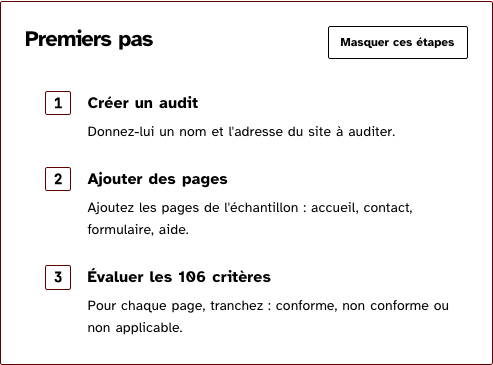
The first visit with nothing done, a visit with a step done and actions on the others, and dismissible.
dismissible
With ondismiss, a ghost button with its words; the page hides the block and says so.
Light
Premiers pas
-
Créer un audit
Donnez-lui un nom et l'adresse du site à auditer.
-
Ajouter des pages
Ajoutez les pages de l'échantillon : accueil, contact, formulaire, aide.
-
Évaluer les 106 critères
Pour chaque page, tranchez : conforme, non conforme ou non applicable.
Dark
Premiers pas
-
Créer un audit
Donnez-lui un nom et l'adresse du site à auditer.
-
Ajouter des pages
Ajoutez les pages de l'échantillon : accueil, contact, formulaire, aide.
-
Évaluer les 106 critères
Pour chaque page, tranchez : conforme, non conforme ou non applicable.
320 px, light
Premiers pas
-
Créer un audit
Donnez-lui un nom et l'adresse du site à auditer.
-
Ajouter des pages
Ajoutez les pages de l'échantillon : accueil, contact, formulaire, aide.
-
Évaluer les 106 critères
Pour chaque page, tranchez : conforme, non conforme ou non applicable.
320 px, dark
Premiers pas
-
Créer un audit
Donnez-lui un nom et l'adresse du site à auditer.
-
Ajouter des pages
Ajoutez les pages de l'échantillon : accueil, contact, formulaire, aide.
-
Évaluer les 106 critères
Pour chaque page, tranchez : conforme, non conforme ou non applicable.
216 px, light
Premiers pas
-
Créer un audit
Donnez-lui un nom et l'adresse du site à auditer.
-
Ajouter des pages
Ajoutez les pages de l'échantillon : accueil, contact, formulaire, aide.
-
Évaluer les 106 critères
Pour chaque page, tranchez : conforme, non conforme ou non applicable.
Forced colours, captured
underWay
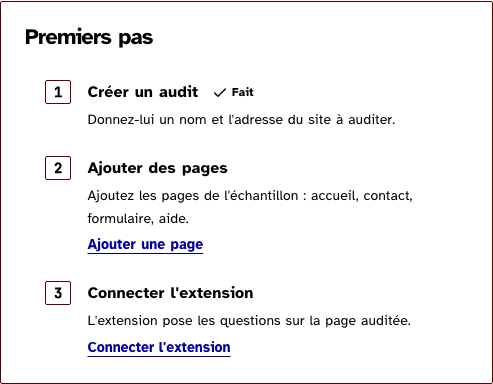
A step done carries the check drawing and the word; a step to do may carry its own action, a link or a button.
Light
Premiers pas
-
Créer un audit , Fait
Donnez-lui un nom et l'adresse du site à auditer.
-
Ajouter des pages
Ajoutez les pages de l'échantillon : accueil, contact, formulaire, aide.
-
Connecter l'extension
L'extension pose les questions sur la page auditée.
Dark
Premiers pas
-
Créer un audit , Fait
Donnez-lui un nom et l'adresse du site à auditer.
-
Ajouter des pages
Ajoutez les pages de l'échantillon : accueil, contact, formulaire, aide.
-
Connecter l'extension
L'extension pose les questions sur la page auditée.
320 px, light
Premiers pas
-
Créer un audit , Fait
Donnez-lui un nom et l'adresse du site à auditer.
-
Ajouter des pages
Ajoutez les pages de l'échantillon : accueil, contact, formulaire, aide.
-
Connecter l'extension
L'extension pose les questions sur la page auditée.
320 px, dark
Premiers pas
-
Créer un audit , Fait
Donnez-lui un nom et l'adresse du site à auditer.
-
Ajouter des pages
Ajoutez les pages de l'échantillon : accueil, contact, formulaire, aide.
-
Connecter l'extension
L'extension pose les questions sur la page auditée.
216 px, light
Premiers pas
-
Créer un audit , Fait
Donnez-lui un nom et l'adresse du site à auditer.
-
Ajouter des pages
Ajoutez les pages de l'échantillon : accueil, contact, formulaire, aide.
-
Connecter l'extension
L'extension pose les questions sur la page auditée.
Forced colours, captured
welcome
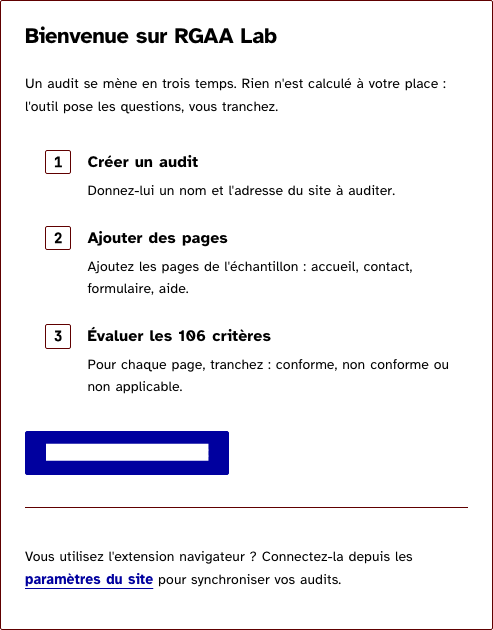
The dashboard's shape: a sentence, three steps, the one call to action, and a pointer at the foot.
Light
Bienvenue sur RGAA Lab
Un audit se mène en trois temps. Rien n'est calculé à votre place : l'outil pose les questions, vous tranchez.
-
Créer un audit
Donnez-lui un nom et l'adresse du site à auditer.
-
Ajouter des pages
Ajoutez les pages de l'échantillon : accueil, contact, formulaire, aide.
-
Évaluer les 106 critères
Pour chaque page, tranchez : conforme, non conforme ou non applicable.
Dark
Bienvenue sur RGAA Lab
Un audit se mène en trois temps. Rien n'est calculé à votre place : l'outil pose les questions, vous tranchez.
-
Créer un audit
Donnez-lui un nom et l'adresse du site à auditer.
-
Ajouter des pages
Ajoutez les pages de l'échantillon : accueil, contact, formulaire, aide.
-
Évaluer les 106 critères
Pour chaque page, tranchez : conforme, non conforme ou non applicable.
320 px, light
Bienvenue sur RGAA Lab
Un audit se mène en trois temps. Rien n'est calculé à votre place : l'outil pose les questions, vous tranchez.
-
Créer un audit
Donnez-lui un nom et l'adresse du site à auditer.
-
Ajouter des pages
Ajoutez les pages de l'échantillon : accueil, contact, formulaire, aide.
-
Évaluer les 106 critères
Pour chaque page, tranchez : conforme, non conforme ou non applicable.
320 px, dark
Bienvenue sur RGAA Lab
Un audit se mène en trois temps. Rien n'est calculé à votre place : l'outil pose les questions, vous tranchez.
-
Créer un audit
Donnez-lui un nom et l'adresse du site à auditer.
-
Ajouter des pages
Ajoutez les pages de l'échantillon : accueil, contact, formulaire, aide.
-
Évaluer les 106 critères
Pour chaque page, tranchez : conforme, non conforme ou non applicable.
216 px, light
Bienvenue sur RGAA Lab
Un audit se mène en trois temps. Rien n'est calculé à votre place : l'outil pose les questions, vous tranchez.
-
Créer un audit
Donnez-lui un nom et l'adresse du site à auditer.
-
Ajouter des pages
Ajoutez les pages de l'échantillon : accueil, contact, formulaire, aide.
-
Évaluer les 106 critères
Pour chaque page, tranchez : conforme, non conforme ou non applicable.
Forced colours, captured
Accessibility contract
- Role and name: a
sectionnamed by its heading througharia-labelledby; anolof steps; a step’s action is a Link withhref, a Button otherwise. - Keyboard, focus: the actions’, in reading order. The dismiss comes first, next to the heading; the page moves the focus to what follows when it hides the block.
- Live regions: none of the block’s. The page says “Les premiers pas sont masqués.” through its LiveRegion after a dismiss.
- A step done says “Fait” in words, after a hidden comma so the label and the state are heard apart.
Content rules
French. The heading welcomes or names the moment (“Bienvenue sur RGAA Lab”, “Premiers pas”). Each label is a verb in the infinitive (“Créer un audit”); each description one sentence ending with a period. The call to action says what it does (“Créer mon premier audit”).
Do and don’t
- Do keep the steps to what the user must do, in the order it must be done.
- Do give a step done its
doneflag rather than removing it: the list says how far the user has come. - Do not number the labels by hand; the list numbers them.
- Do not put a glyph in an action’s words; the words say it.
Examples
<Onboarding title="Bienvenue sur RGAA Lab" steps={STEPS}>
	<p>Un audit se mène en trois temps.</p>
	{#snippet actions()}<Button onclick={openForm}>Créer mon premier audit</Button>{/snippet}
	{#snippet footer()}<p>Connectez l'extension depuis les <Link href={settings}>paramètres du site</Link>.</p>{/snippet}
</Onboarding>
Surfaces
- App: the dashboard of an account without audits.
Related
EmptyState, Card, Button, Link.
Decisions
- 2026-09-27: the rank is drawn and hidden, the list is ordered: the number is read once, by the list.
- 2026-09-27: a step done keeps its place with the check and “Fait”, and loses its action: there is nothing left to do there.
Criteria held by construction
- 9.1, Dans chaque page web, l'information est-elle structurée par l'utilisation appropriée de titres ?
The block is a section named by a heading at the level the page gives, so a reader jumping by headings finds the first steps where the list of audits will be. - 9.3, Dans chaque page web, chaque liste est-elle correctement structurée ?
The steps are an ordered list: the order is the list's, heard as '1 sur 3', and the rank drawn next to a step is hidden rather than read twice. - 3.1, Dans chaque page web, l'information ne doit pas être donnée uniquement par la couleur. Cette règle est-elle respectée ?
A step done carries the check drawing and the word 'Fait'; the ink of conformity only confirms what the word says. - 11.9, Dans chaque formulaire, l'intitulé de chaque bouton est-il pertinent ?
Every action, a step's own, the call to action and the dismiss, is named by its visible words, never by an aria-label that differs from them.
Tokens it reads
- Colour:
--rl-bg,--rl-c,--rl-ink,--rl-ink-soft,--rl-line - Typography:
--rl-font-mono,--rl-weight-bold,--rl-text-sm,--rl-text-xs,--rl-measure-prose - Spacing:
--rl-space-1,--rl-space-2,--rl-space-3,--rl-space-4,--rl-space-6,--rl-space-8 - Layout:
--rl-radius,--rl-border