molecule · stable · since 2026-09
PageHeader
Purpose
The head of a page: an eyebrow, the title as the h1, one sentence, and the page’s actions where the eye expects them. One component so every page opens the same way.
When to use, when not
Use it at the top of every page of the app, and for a section laid out like a page at level 2. Not for a card’s title, not for a dialog’s.
Anatomy
- The eyebrow, optional.
- The title, h1 or h2.
- The lead, optional.
- The actions, optional.
Props
| Name | Type | Default | What it does |
|---|---|---|---|
title | string | The page's title, as its h1. | |
eyebrow? | string | undefined | A line above the title in small capitals: the section, a count. Undefined when the page has none to say, so a page passes what it computed. | |
lead? | string | undefined | One sentence under the title. Undefined when there is none. | |
level? | 1 | 2 | 1 | The heading level; 1 on a page, 2 for the head of a section laid out the same way. |
class? | string | '' | Layout classes only. |
actions? | Snippet | The page's actions: a primary Button, or a Menu. |
States
Plain, with an eyebrow, a lead and an action, and at level 2.
plain
Light
Mes audits
Dark
Mes audits
320 px, light
Mes audits
320 px, dark
Mes audits
216 px, light
Mes audits
Forced colours, captured

section
The same head at level 2, for a section laid out like a page.
Light
Les pages de l'échantillon
Chaque page est auditée sur les 106 critères.
Dark
Les pages de l'échantillon
Chaque page est auditée sur les 106 critères.
320 px, light
Les pages de l'échantillon
Chaque page est auditée sur les 106 critères.
320 px, dark
Les pages de l'échantillon
Chaque page est auditée sur les 106 critères.
216 px, light
Les pages de l'échantillon
Chaque page est auditée sur les 106 critères.
Forced colours, captured

withAction
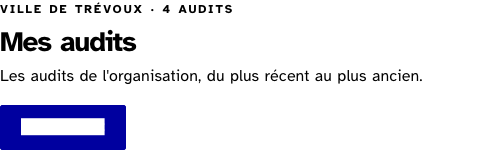
The page's one primary action, on the title's line when there is room.
Light
Ville de Trévoux · 4 audits
Mes audits
Les audits de l'organisation, du plus récent au plus ancien.
Dark
Ville de Trévoux · 4 audits
Mes audits
Les audits de l'organisation, du plus récent au plus ancien.
320 px, light
Ville de Trévoux · 4 audits
Mes audits
Les audits de l'organisation, du plus récent au plus ancien.
320 px, dark
Ville de Trévoux · 4 audits
Mes audits
Les audits de l'organisation, du plus récent au plus ancien.
216 px, light
Ville de Trévoux · 4 audits
Mes audits
Les audits de l'organisation, du plus récent au plus ancien.
Forced colours, captured
Accessibility contract
- Role and name: a
headerelement inside the main landmark, holding the heading; no landmark role of its own, since the page’s banner is the shell’s. - Keyboard, focus: the actions’ own.
- Live regions: none.
Content rules
French. The title is a noun phrase, the page’s name (“Mes audits”); the eyebrow gives the context or a count; the lead is one sentence.
Do and don’t
- Do put one primary action at most in the actions; the rest are secondary or in a Menu.
- Do not put the breadcrumb inside; it comes before the header.
Examples
<Breadcrumb items={path} />
<PageHeader eyebrow="{organisation} · {count} audits" title="Mes audits">
	{#snippet actions()}<Button href="/lab/audits/new">Nouvel audit</Button>{/snippet}
</PageHeader>
Surfaces
- App: the dashboard, the organisation, the site and its settings, the new organisation, site and audit, the comparison, the audited page; at level 2, the section heads that carry an action or a count.
Related
Heading, Eyebrow, Prose, Button, Breadcrumb.
Decisions
- 2026-09-24: composed from Heading, Eyebrow and Prose, so the type of a page head cannot drift from the type elsewhere.
Criteria held by construction
- 9.1, Dans chaque page web, l'information est-elle structurée par l'utilisation appropriée de titres ?
The title is the page's h1, or the h2 of a section laid out the same way; the level is a prop, never a size. - 12.8, Dans chaque page web, l'ordre de tabulation est-il cohérent ?
The actions come after the title in the DOM, where the reading order and the tab order expect them.
Tokens it reads
- Spacing:
--rl-space-2,--rl-space-3,--rl-space-4,--rl-space-6,--rl-space-8