view · stable · extension · since 2026-09
PanelShell
Purpose
The column of the extension’s side panel: a header that stays, a content landmark that scrolls, a foot that stays, and a banner above them when something concerns the page. One shell for every state of the panel, hidden with the attribute while a wizard runs over it.
When to use, when not
Use it as the frame of the panel’s audit screen, and of any screen that has a header and a scrolling list. Not for a wizard, which has WizardFrame; not for the welcome and access screens, which are one column of text.
Anatomy
- The banner, above everything, for what concerns the page.
- The header: the progress, the title row with the theme switch, the counters, the page switcher.
- The content, the panel’s main landmark, which scrolls.
- The foot, with the keys.
Props
| Name | Type | Default | What it does |
|---|---|---|---|
label | string | The name of the content landmark: what the panel shows ("Audit de la page"). | |
as? | 'main' | 'div' | 'main' | `main` in the panel, where the shell is the document; `div` inside a page that already has a main, as a named region. |
hidden? | boolean | false | Hidden under a wizard: the shell stays mounted and leaves the tab order. |
id? | string | undefined | The column's id: the root a consumer's click delegate listens on and reads from. | |
class? | string | '' | Layout classes only. |
banner? | Snippet | Above the header: a banner about the page or the parameters. | |
header? | Snippet | The header: the progress, the title row, the counters, the page switcher. It stays in sight. | |
children | Snippet | The content, which scrolls: the themes and their criteria. | |
footer? | Snippet | The foot: the keys the wizards answer to. It stays in sight. |
States
Bare, full with its id and the progress strip, and hidden under a wizard.
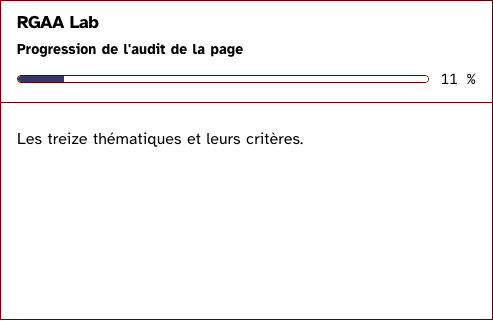
bare
The header and the content, rendered as a named region since this page already has a main.
Light
RGAA Lab
Les treize thématiques et leurs critères.
Dark
RGAA Lab
Les treize thématiques et leurs critères.
320 px, light
RGAA Lab
Les treize thématiques et leurs critères.
320 px, dark
RGAA Lab
Les treize thématiques et leurs critères.
216 px, light
RGAA Lab
Les treize thématiques et leurs critères.
Forced colours, captured
full
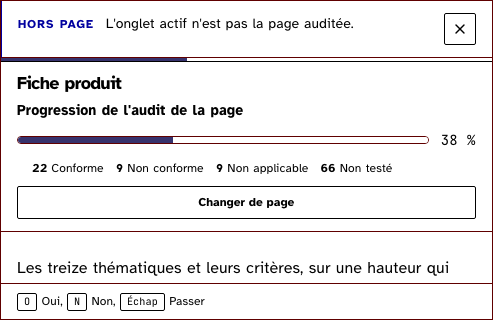
The banner above the header with the thin strip of the audit’s progress, the counters, the content that scrolls, the keys at the foot. The column carries the id a click delegate listens on.
Light
Fiche produit
- 22 Conforme
- 9 Non conforme
- 9 Non applicable
- 66 Non testé
Les treize thématiques et leurs critères, sur une hauteur qui déborde le panneau et fait défiler le contenu seul.
1. Images
2. Cadres
3. Couleurs
4. Multimédia
5. Tableaux
6. Liens
7. Scripts
8. Éléments obligatoires
9. Structuration de l'information
10. Présentation de l'information
11. Formulaires
12. Navigation
13. Consultation
Dark
Fiche produit
- 22 Conforme
- 9 Non conforme
- 9 Non applicable
- 66 Non testé
Les treize thématiques et leurs critères, sur une hauteur qui déborde le panneau et fait défiler le contenu seul.
1. Images
2. Cadres
3. Couleurs
4. Multimédia
5. Tableaux
6. Liens
7. Scripts
8. Éléments obligatoires
9. Structuration de l'information
10. Présentation de l'information
11. Formulaires
12. Navigation
13. Consultation
320 px, light
Fiche produit
- 22 Conforme
- 9 Non conforme
- 9 Non applicable
- 66 Non testé
Les treize thématiques et leurs critères, sur une hauteur qui déborde le panneau et fait défiler le contenu seul.
1. Images
2. Cadres
3. Couleurs
4. Multimédia
5. Tableaux
6. Liens
7. Scripts
8. Éléments obligatoires
9. Structuration de l'information
10. Présentation de l'information
11. Formulaires
12. Navigation
13. Consultation
320 px, dark
Fiche produit
- 22 Conforme
- 9 Non conforme
- 9 Non applicable
- 66 Non testé
Les treize thématiques et leurs critères, sur une hauteur qui déborde le panneau et fait défiler le contenu seul.
1. Images
2. Cadres
3. Couleurs
4. Multimédia
5. Tableaux
6. Liens
7. Scripts
8. Éléments obligatoires
9. Structuration de l'information
10. Présentation de l'information
11. Formulaires
12. Navigation
13. Consultation
216 px, light
Forced colours, captured
underWizard
Hidden with the attribute while a wizard runs over it: the shell stays mounted, out of the tab order. Nothing shows here, which is the point.
Light
RGAA Lab
Le contenu du panneau, sous l'assistant.
Dark
RGAA Lab
Le contenu du panneau, sous l'assistant.
320 px, light
RGAA Lab
Le contenu du panneau, sous l'assistant.
320 px, dark
RGAA Lab
Le contenu du panneau, sous l'assistant.
216 px, light
RGAA Lab
Le contenu du panneau, sous l'assistant.
Accessibility contract
- Role and name:
mainnamed bylabelin the panel, withid="main-content"; aregionwith the same name inside a page that already has a main. Both taketabindex="0": the scrolling area must be reachable by Tab when it holds only text (criterion 7.3). The header isheader, the foot isfooter. - Keyboard, focus: the content scrolls with the keyboard since it holds focusable controls. Hidden, the whole shell leaves the tab order, and the focus a wizard took comes back to the control that opened it when the shell shows again.
- Live regions: none of the shell’s. The panel’s root owns the status and alert regions, present from the first render, above every screen.
Content rules
French. The label names what the content holds (“Audit de la page”); the foot lists the keys the wizards answer to, in one line.
Do and don’t
- Do put the two live regions before the shell, in the panel’s root, not in a header snippet.
- Do keep the header short: at 216 pixels every row of it costs the list a line.
- Do not scroll the header or the foot; only the content moves.
- Do give the column its
idwhen a click delegate listens on it, rather than wrapping the shell in an element of your own.
Examples
<PanelShell label="Audit de la page" hidden={wizard.open}>
	{#snippet banner()}<OffPageBanner />{/snippet}
	{#snippet header()}<Header />{/snippet}
	{#snippet footer()}<Kbd>O</Kbd> Oui, <Kbd>N</Kbd> Non{/snippet}
	<ThemeList {themes} onstatus={setStatus} />
</PanelShell>
Surfaces
- Extension: the audit screen of the panel, once it is on Svelte.
Related
WizardFrame, ThemeList, LiveRegion, Banner, StatusCounters.
Decisions
- 2026-09-26: the shell hides with the attribute under a wizard rather than unmounting: the list’s scroll position and the button that opened the wizard survive, and the focus has somewhere to return.
- 2026-09-26: the content is the
mainlandmark, not a region inside one: in the panel the shell is the document, and a page with two mains is the fault the engine reports first. - 2026-09-27: the column takes an
id, and nothing else: the extension wrapped the shell in adivonly to carry the id its click delegate listens on. An id, not rest props, so the column’s role and hidden state stay the shell’s.
Criteria held by construction
- 12.6, Les zones de regroupement de contenus présentes dans plusieurs pages web (zones d'en-tête, de navigation principale, de contenu principal, de pied de page et de moteur de recherche) peuvent-elles être atteintes ou évitées ?
The content is the panel's main landmark, or a named region inside a page that has one; the header and the foot are landmarks of their own. - 12.8, Dans chaque page web, l'ordre de tabulation est-il cohérent ?
The header comes first in the DOM, the content next, the foot last: the tab order is the reading order, and a hidden shell leaves it entirely. - 12.7, Dans chaque page web, un lien d'évitement ou d'accès rapide à la zone de contenu principal est-il présent ?
As the main landmark it carries the id the skip link targets and a tabindex, so the link really moves the focus. - 7.3, Chaque script est-il contrôlable par le clavier et par tout dispositif de pointage ?
The scrolling area is a Tab stop in both forms, so a keyboard can scroll a screen that holds only text.
Tokens it reads
- Colour:
--rl-bg,--rl-ink,--rl-ink-soft,--rl-line - Typography:
--rl-text-xs - Spacing:
--rl-space-2,--rl-space-3,--rl-space-4 - Layout:
--rl-border