view · stable · app · since 2026-09
ReportDocument
Purpose
The frame of a document read on screen and handed over on paper: the audit report. On screen, a title with its actions, the sections, and a summary that sticks beside the text on a wide screen. On paper, a cover, a rights page and a table of contents that the screen never shows, a header on every page, parts that start at the top of a page, headings that never stay alone at the bottom of one.
When to use, when not
Use it for a document the product hands over: the audit report, a declaration preview. Not for a page of the app, which takes the AppShell’s content area as it is.
Anatomy
- The document column: the cover, the rights page and the table of contents (paper only), the printed header (paper only), the head with the h1 and the actions (screen only), the notice (screen only), then the sections.
- The summary: a navigation landmark listing the plan, sticky beside the document on a wide screen, absent on paper.
Props
| Name | Type | Default | What it does |
|---|---|---|---|
title | string | The document's title on screen, as the h1: "Rapport d'audit". | |
subtitle? | string | undefined | One line under the title: the audit and the standard. | |
coverEyebrow | string | The line above the cover's title on paper: "Rapport d'audit d'accessibilité". | |
coverTitle | string | The cover's title on paper: the site's name. | |
coverLine? | string | undefined | A line under the cover's title: the site's address. | |
coverItems | CoverItem[] | The cover's facts: the standard, the date, who audited. | |
coverFootnote? | string | undefined | A sentence at the foot of the cover. | |
printHeader | string | The header repeated on every printed page after the cover. | |
printHeaderDetail? | string | undefined | A second line of the printed header. | |
plan | PlanEntry[] | The plan, served as the summary on screen and the table of contents on paper. | |
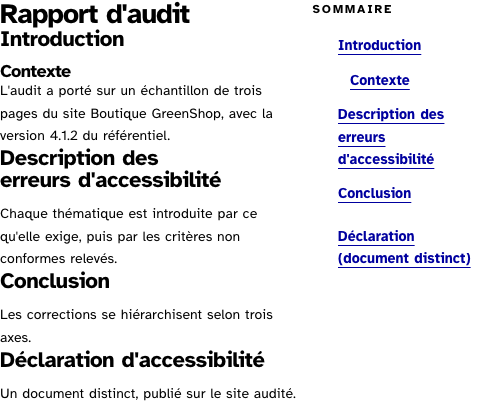
summaryExtras? | Array<{ href: string; label: string }> | [] | Entries of the summary that are not in the document: a distinct artefact shown after it. |
summaryLabel? | string | 'Sommaire du rapport' | The summary landmark's name. |
contentsLabel? | string | 'Table des matières' | The table of contents' heading on paper. |
rights? | Snippet | A page printed after the cover: the rights of reproduction, as a section with its heading. | |
actions? | Snippet | The screen's actions beside the title: print, export. | |
notice? | Snippet | What the screen says under the actions and the paper never shows: a status region, a notice. | |
children | Snippet | The document's sections. |
States
The document on screen, and one with a rights page and a summary extra.
screen
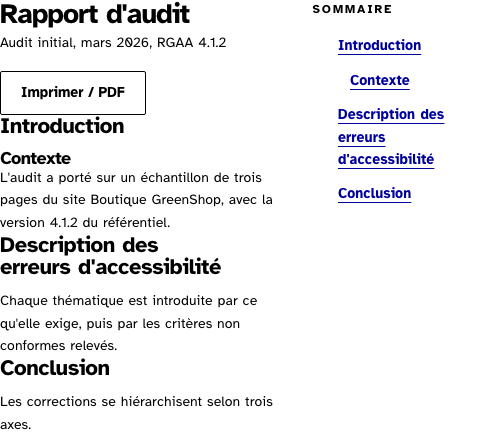
The document on screen: the title with its actions, the sections, the summary beside them on a wide frame. The cover and the table of contents exist on paper only.
Light
Rapport d'audit
Audit initial, mars 2026, RGAA 4.1.2
Introduction
Contexte
L'audit a porté sur un échantillon de trois pages du site Boutique GreenShop, avec la version 4.1.2 du référentiel.
Description des erreurs d'accessibilité
Chaque thématique est introduite par ce qu'elle exige, puis par les critères non conformes relevés.
Conclusion
Les corrections se hiérarchisent selon trois axes.
Dark
Rapport d'audit
Audit initial, mars 2026, RGAA 4.1.2
Introduction
Contexte
L'audit a porté sur un échantillon de trois pages du site Boutique GreenShop, avec la version 4.1.2 du référentiel.
Description des erreurs d'accessibilité
Chaque thématique est introduite par ce qu'elle exige, puis par les critères non conformes relevés.
Conclusion
Les corrections se hiérarchisent selon trois axes.
320 px, light
Rapport d'audit
Audit initial, mars 2026, RGAA 4.1.2
Introduction
Contexte
L'audit a porté sur un échantillon de trois pages du site Boutique GreenShop, avec la version 4.1.2 du référentiel.
Description des erreurs d'accessibilité
Chaque thématique est introduite par ce qu'elle exige, puis par les critères non conformes relevés.
Conclusion
Les corrections se hiérarchisent selon trois axes.
320 px, dark
Rapport d'audit
Audit initial, mars 2026, RGAA 4.1.2
Introduction
Contexte
L'audit a porté sur un échantillon de trois pages du site Boutique GreenShop, avec la version 4.1.2 du référentiel.
Description des erreurs d'accessibilité
Chaque thématique est introduite par ce qu'elle exige, puis par les critères non conformes relevés.
Conclusion
Les corrections se hiérarchisent selon trois axes.
216 px, light
Rapport d'audit
Audit initial, mars 2026, RGAA 4.1.2
Introduction
Contexte
L'audit a porté sur un échantillon de trois pages du site Boutique GreenShop, avec la version 4.1.2 du référentiel.
Description des erreurs d'accessibilité
Chaque thématique est introduite par ce qu'elle exige, puis par les critères non conformes relevés.
Conclusion
Les corrections se hiérarchisent selon trois axes.
Forced colours, captured
withRights
With a rights page printed after the cover, and a summary extra pointing at a distinct artefact.
Light
Droits de reproduction
Sa structure et les textes introduisant chacune des treize thématiques sont repris du modèle de la DINUM, placé sous Licence Ouverte 2.0.
Rapport d'audit
Introduction
Contexte
L'audit a porté sur un échantillon de trois pages du site Boutique GreenShop, avec la version 4.1.2 du référentiel.
Description des erreurs d'accessibilité
Chaque thématique est introduite par ce qu'elle exige, puis par les critères non conformes relevés.
Conclusion
Les corrections se hiérarchisent selon trois axes.
Déclaration d'accessibilité
Un document distinct, publié sur le site audité.
Dark
Droits de reproduction
Sa structure et les textes introduisant chacune des treize thématiques sont repris du modèle de la DINUM, placé sous Licence Ouverte 2.0.
Rapport d'audit
Introduction
Contexte
L'audit a porté sur un échantillon de trois pages du site Boutique GreenShop, avec la version 4.1.2 du référentiel.
Description des erreurs d'accessibilité
Chaque thématique est introduite par ce qu'elle exige, puis par les critères non conformes relevés.
Conclusion
Les corrections se hiérarchisent selon trois axes.
Déclaration d'accessibilité
Un document distinct, publié sur le site audité.
320 px, light
Droits de reproduction
Sa structure et les textes introduisant chacune des treize thématiques sont repris du modèle de la DINUM, placé sous Licence Ouverte 2.0.
Rapport d'audit
Introduction
Contexte
L'audit a porté sur un échantillon de trois pages du site Boutique GreenShop, avec la version 4.1.2 du référentiel.
Description des erreurs d'accessibilité
Chaque thématique est introduite par ce qu'elle exige, puis par les critères non conformes relevés.
Conclusion
Les corrections se hiérarchisent selon trois axes.
Déclaration d'accessibilité
Un document distinct, publié sur le site audité.
320 px, dark
Droits de reproduction
Sa structure et les textes introduisant chacune des treize thématiques sont repris du modèle de la DINUM, placé sous Licence Ouverte 2.0.
Rapport d'audit
Introduction
Contexte
L'audit a porté sur un échantillon de trois pages du site Boutique GreenShop, avec la version 4.1.2 du référentiel.
Description des erreurs d'accessibilité
Chaque thématique est introduite par ce qu'elle exige, puis par les critères non conformes relevés.
Conclusion
Les corrections se hiérarchisent selon trois axes.
Déclaration d'accessibilité
Un document distinct, publié sur le site audité.
216 px, light
Droits de reproduction
Sa structure et les textes introduisant chacune des treize thématiques sont repris du modèle de la DINUM, placé sous Licence Ouverte 2.0.
Rapport d'audit
Introduction
Contexte
L'audit a porté sur un échantillon de trois pages du site Boutique GreenShop, avec la version 4.1.2 du référentiel.
Description des erreurs d'accessibilité
Chaque thématique est introduite par ce qu'elle exige, puis par les critères non conformes relevés.
Conclusion
Les corrections se hiérarchisent selon trois axes.
Déclaration d'accessibilité
Un document distinct, publié sur le site audité.
Forced colours, captured
Accessibility contract
- Role and name: the summary is
navnamed bysummaryLabel; the table of contents isnavnamed bycontentsLabelwith a level-2 heading; the cover isaria-hidden, since the breadcrumb and the head say the same on screen. - Keyboard, focus: the summary’s links; the sections’ own.
- Live regions: none of the frame’s; a page puts its status region in
notice. - Print: the parts the page marks with
rl-report__partstart a new page;rl-report__keeprefuses to be split across two; headings avoid a break after them; tables repeat their header; links out show their address.
Content rules
French. The title is the document’s name (“Rapport d’audit”), the subtitle the audit and the standard. The cover carries the site’s name, its address, and facts as term and value. The plan’s labels are the sections’ headings, verbatim.
Do and don’t
- Do write the plan once and give the sections the same ids, so the summary and the table of contents cannot lie.
- Do mark the parts with
rl-report__partrather than choosing page breaks in the page’s own stylesheet. - Do not put the declaration inside the document: it is another artefact, shown after with a summary extra.
Examples
<ReportDocument
	title="Rapport d'audit"
	subtitle="{audit.name}, RGAA 4.1.2"
	coverEyebrow="Rapport d'audit d'accessibilité"
	coverTitle={project.name}
	coverItems={[{ id: 'ref', term: 'Référentiel', value: 'RGAA 4.1.2' }]}
	printHeader="Rapport d'audit RGAA, {audit.name}"
	{plan}
>
	{#snippet actions()}<Button variant="secondary" onclick={() => window.print()}>Imprimer / PDF</Button>{/snippet}
	<section id="introduction" aria-labelledby="introduction-heading">…</section>
	<section id="erreurs" class="rl-report__part" aria-labelledby="erreurs-heading">…</section>
</ReportDocument>
Surfaces
- App: the audit report.
Related
Heading, Table, Card, DefinitionList, PrintPage.
Decisions
- 2026-09-26: the page rules of the report (
@page, orphans, breaks, the address after a link) left the app’s stylesheet: a document’s paper is the document’s. They live instyles/print.css, shared with PrintPage, which a surface that prints loads afterbase.css; this frame keeps only the look of its own elements on paper. - 2026-09-26: the table of contents has no page numbers, since no browser implements the margin boxes or the page counter; the browser’s own header carries the number.
Criteria held by construction
- 12.6, Les zones de regroupement de contenus présentes dans plusieurs pages web (zones d'en-tête, de navigation principale, de contenu principal, de pied de page et de moteur de recherche) peuvent-elles être atteintes ou évitées ?
The summary is a navigation landmark named for the document; the table of contents on paper is another, with its heading. - 9.1, Dans chaque page web, l'information est-elle structurée par l'utilisation appropriée de titres ?
The document's title is the h1 on screen; the plan's levels are an indent, and the outline is the sections' own headings. - 12.8, Dans chaque page web, l'ordre de tabulation est-il cohérent ?
The summary comes after the document in the DOM and beside it on a wide screen, so the reading order is the document first. - 10.11, Pour chaque page web, les contenus peuvent-ils être présentés sans avoir recours à un défilement vertical pour une fenêtre ayant une hauteur de 256px ou à un défilement horizontal pour une fenêtre ayant une largeur de 320px ?
The document column has no minimum width, so a matrix of 106 columns scrolls in its region instead of widening the page.
Tokens it reads
- Colour:
--rl-action,--rl-action-hover,--rl-ink-soft,--rl-line,--rl-line-strong - Typography:
--rl-weight-bold,--rl-text-lg,--rl-text-sm,--rl-text-xs,--rl-tracking-eyebrow - Spacing:
--rl-space-1,--rl-space-2,--rl-space-20,--rl-space-3,--rl-space-4,--rl-space-8 - Layout:
--rl-radius,--rl-border,--rl-border-strong